

Microsoft OneDrive




Microsoft OneDrive App Info
-
App Name
Microsoft OneDrive
-
Package Name
com.microsoft.skydrive
-
Developer
Microsoft Corporation -
Category
Productivity -
Updated
2026/10/01
-
Version
7.64.2
1. Reviewer’s View: A practical cloud drive with offline access and strong security
Microsoft OneDrive starts you with 5 GB free storage, then invites you to go further with Personal 1 TB or Family 2 TB shared for up to six people.
From a reviewer’s standpoint, the onboarding is simple, and the app quickly becomes a daily hub for documents, photos, and business files.
OneDrive’s biggest practical strength is access anywhere, including offline, which helps when travel, commutes, or spotty connections disrupt work.
Backing up photos and videos feels nearly hands-off, especially with Camera Upload, and the secure locker adds structure for private media.
Sharing is also polished for both personal and business workflows, with notifications when shared documents are edited.
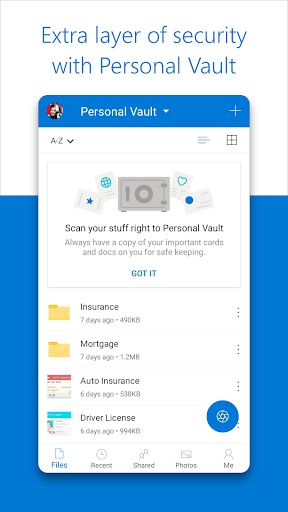
Encryption at rest and in transit, plus features like Personal Vault identity verification, make it feel enterprise-minded rather than purely consumer.
There are also clear upgrade paths for finance professionals and SaaS teams who need larger storage, safer sharing links, and version history for audit-like recovery.
For subscription buyers, OneDrive aligns with Microsoft 365 expectations by bundling premium Office access and collaboration experiences tied to qualifying plans.
Overall, the app reads like a serious storage platform for both home users and teams that want dependable sync, secure sharing, and document workflows.
2. Four standout strengths reviewers will notice right away
First, you get automatic photo and video backup through Camera Upload, then secure tagging in a dedicated photo locker for easier later retrieval.
Second, selected files can be accessed offline, which supports productivity for people handling invoices, reports, and shared media without constant internet.
Third, encrypted storage plus Personal Vault identity verification adds a credible security layer for sensitive business materials and personal files.
Fourth, version history and ransomware detection help reduce the cost of mistakes, accidental edits, or malicious events for individuals and small teams.
3. Four limitations and friction points worth considering
One limitation is that premium capabilities largely depend on Microsoft 365 subscriptions, so power users may feel nudged toward paid tiers.
Another friction point is that offline access works best with selected files, meaning you may need to manage what’s cached for consistent use.
Sharing links can be powerful, but deciding between password-protected or expiring options takes a moment of setup and judgment.
Finally, collaboration shines with Microsoft Office apps, yet users expecting a more independent editing ecosystem may prefer alternatives for certain workflows.
4. What’s new: helpful upgrades for modern document workflows
The latest experience emphasizes faster organization and clearer file workflows, including Copilot-powered assistance like summarizing documents and extracting key details.
You can also get intelligent suggestions for structuring folders, which is useful for finance tracking, project document sets, and SaaS operational records.
Copilot recommendations extend to sharing and collaboration, helping teams align permissions and communication patterns more quickly.
Security and recovery remain a focus, with ransomware detection and File Restore improving the practicality of recovering from incidents.
Search also feels more advanced, since you can search photos by what’s shown and search documents by name or content across your library.
For subscription-minded users, premium sharing options and greater daily sharing capacity make OneDrive more suitable for active business publishing and review cycles.
5. Bottom line for high-value advertisers and serious users
OneDrive is a strong choice for consumers, creators, and professionals seeking secure cloud storage, reliable sync, and secure access controls.
Its storage tiers, premium sharing features, and recovery tools make it especially relevant for finance workflows, payments documentation, and business continuity planning.
The app also supports enterprise-adjacent expectations through encryption, version history, and identity-verified protection via Personal Vault.
If you want a Microsoft 365-aligned experience with document scanning, Copilot assistance, and offline access, OneDrive feels built for ongoing productivity.


